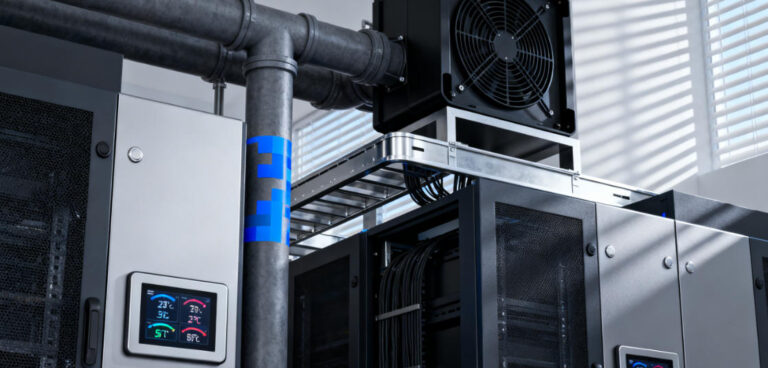
This authoritative guide to data center rack cooling is your one-stop resource for mastering thermal management. The guide helps you ensure the resilience, efficiency, and scalability of your IT infrastructure.
Refined from extensive literature,from core principles to in-depth comparisons of air cooling, liquid cooling, modular cooling, and immersion cooling technologies, we explain everything you need to know to help you choose the data center rack cooling solution.
We focus on addressing key pain points—eliminating hotspots, reducing PUE by 0.1-0.5, reducing energy consumption by 20-40%, and avoiding $100000 per hour of downtime—while exploring key optimization factors such as rack layout, hardware configuration, maintenance, and AI-driven automation.
Whether you’re upgrading existing racks to increase density, building new edge data centers, or striving for net-zero emissions, this guide provides a practical framework, real-world case studies, and future-proofing trends to help you turn rack cooling from a disadvantage into a competitive advantage.
For data center managers, IT engineers, and facility operators, this is the ultimate guide to overcoming thermal challenges and maximizing the performance, lifespan, and sustainability of rack-mounted equipment.

1. Core Principles of Data Center Rack Cooling
Before diving into technologies, it’s critical to master the foundational principles that govern effective rack cooling. These principles apply to all data center sizes and rack densities, forming the basis of any successful cooling strategy.
1.1 Thermal Load
Thermal load is the total heat generated by a rack’s IT equipment and environmental factors. It’s the starting point for selecting and sizing cooling solutions.
IT Equipment Heat: Accounts for 80–90% of total rack thermal load. Calculate it by summing the rated power of all devices (e.g., 10 servers × 750W = 7.5kW; 4 GPUs × 300W = 1.2kW → Total IT load = 8.7kW).
Environmental Add-Ons: Add 10–20% to the IT load for heat from sunlight, poor insulation, or adjacent heat-generating equipment.
Growth Buffer: Include a 10–15% buffer to accommodate future hardware upgrades or rack expansions.
Key Insight: Undersizing cooling for thermal load is the 1 mistake data center operators make. A 2024 survey by Data Center Dynamics found that 38% of facilities experience hot spots due to inaccurate thermal load calculations.
1.2 Critical Metrics
To measure and optimize rack cooling, track these industry-standard metrics:
PUE: Total facility power ÷ IT load power. Ideal PUE is 1.0, but rack-level cooling efficiency directly impacts this. For example, switching from air cooling to direct-to-chip liquid cooling can reduce rack-related PUE by 0.2–0.3 .
Rack Inlet/Outlet Temperature: Inlet temperature should stay within 18–24°C; outlet temperature typically ranges from 35–45°C. A delta of >20°C indicates poor airflow or insufficient cooling.
气流速率: Measured in CFM. High-density racks require 1500–2500 CFM to maintain safe temperatures, while low-density racks need 500–1000 CFM.
湿度 40–60% RH prevents corrosion and static electricity, both of which damage rack-mounted equipment.
1.3 Airflow Dynamics
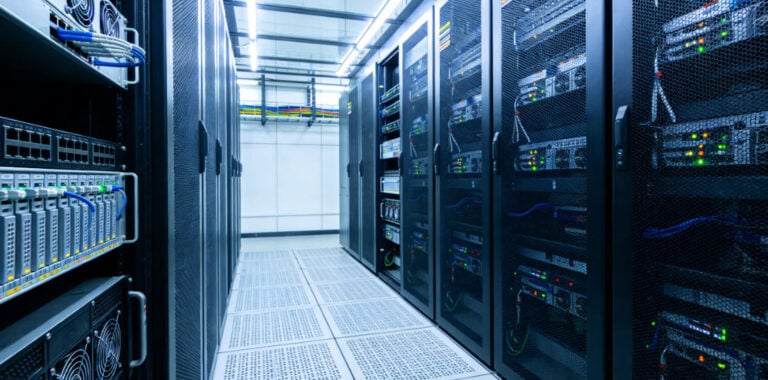
Hot spots—localized heat pockets in racks—are the silent killers of IT hardware. They occur when cool supply air mixes with hot exhaust air, bypassing server intakes. The solution lies in optimizing airflow dynamics:
Cold Aisle/Hot Aisle Configuration: Arrange racks in rows so server intakes face a “cold aisle” and exhausts face a “hot aisle”. This reduces air mixing by 70%.
Containment Systems: Seal cold or hot aisles with physical barriers (panels, doors, or ceilings) to further isolate airflows. Fully contained aisles reduce PUE by 0.1–0.3 and eliminate hot spots in 95% of cases.
Blanking Plates and Cable Management: Empty rack slots and disorganized cables block airflow. Install blanking plates to seal gaps, and use vertical cable organizers to keep aisles clear—improving airflow by 15–20%.
2. Data Center Rack Cooling Technologies
No single cooling technology fits all rack densities and use cases. Below is a detailed breakdown of the most effective solutions, organized by rack density, with pros, cons, and real-world applications.
2.1 Precision Air Cooling
Precision air cooling is the most common rack cooling solution for enterprise data centers and small-to-medium facilities. It uses specialized HVAC systems to deliver cooled air directly to rack inlets.
Types of Precision Air Cooling
- Direct Expansion Units: Self-contained systems that use refrigerant to cool air. Mounted above or beside racks, they’re ideal for small data centers with low-to-medium density.
- Specs: Capacity: 10–50kW/unit; temperature precision: ±1°C; PUE range: 1.3–1.6.
- Chilled Water Air Handlers: Centralized systems that circulate cold water through air handlers. Used in hyperscale facilities with medium density.
- Specs: Capacity: 50–200kW/unit; temperature precision: ±0.5°C; PUE range: 1.2–1.5.
Pros & Cons
- Pros: Low upfront cost, easy installation, minimal maintenance, compatible with most rack configurations.
- Cons: Inefficient for high-density racks, prone to hot spots in dense setups, higher energy use vs. liquid cooling.
Real-World Application
A mid-sized financial services firm in Chicago deployed DX precision air cooling for 20 racks. With cold aisle containment, they maintained a PUE of 1.4 and zero cooling-related downtime over 3 years—saving $12,000 annually on energy costs compared to standard HVAC.
2.2 Liquid Cooling
As rack densities exceed 15kW, liquid cooling becomes the only viable solution. It transfers heat 4–10x more efficiently than air, enabling precise temperature control even for 50kW+ racks.
Types of Liquid Cooling for Racks
- Direct-to-Chip Cooling: Cold plates are attached to CPUs, GPUs, and other high-heat components. A dielectric fluid or water-glycol mixture circulates through the plates, absorbing heat and transferring it to a heat exchanger.
- Specs: Capacity: 20–50kW/rack; fluid temperature: 20–30°C; PUE range: 1.1–1.3.
- 最适合 AI/HPC racks, colocation facilities with mixed-density racks.
- Rack-Mounted Immersion Cooling: Servers are submerged in non-conductive dielectric fluid within a rack-sized tank. The fluid absorbs heat, then circulates to a built-in heat exchanger.
- Specs: Capacity: 50–100kW/rack; fluid temperature: 30–45°C; PUE range: 1.08–1.2.
- 最适合 Ultra-high-density racks, crypto mining, specialized HPC clusters.
Pros & Cons
- Pros: Eliminates hot spots, reduces fan energy use by 70%, lowers PUE significantly, scalable for future density increases.
- Cons: Higher upfront cost, requires fluid management, specialized maintenance.
Real-World Application
NVIDIA’s AI Research Lab in California deployed direct-to-chip liquid cooling for 200 GPU racks. The result: PUE dropped from 1.5 to 1.2, fan energy use fell by 75%, and hardware failure rates decreased by 40%.
2.3 Modular Cooling
Modular cooling systems consist of self-contained, rack-compatible units that operate in parallel. AI-driven controls adjust the number of active units based on real-time rack thermal load—making them ideal for data centers with variable workloads or growing rack counts.
Key Features
- Capacity: 10–40kW per module; scalable from 2–20 modules per rack bank.
- Redundancy: N+1 design ensures no downtime if a unit fails.
- Controls: Integrates with DCIM tools to match cooling output to load—reducing energy waste by 30–40%.
Pros & Cons
- Pros: Pay-as-you-grow model, built-in redundancy, easy to install without facility downtime, compatible with both air and liquid cooling.
- Cons: Higher upfront cost than non-modular air cooling, requires smart control integration.
Real-World Application
AWS’s Ohio Region data center uses modular liquid cooling for 500+ racks with variable densities. The system scales from 2–6 modules per rack bank, cutting energy costs by 35% and reducing PUE to 1.25.
2.4 Free Cooling
Free cooling leverages cool outdoor air or water to reduce mechanical cooling runtime—slashing energy use by 50–70% in temperate or cold climates. It’s often paired with precision air or liquid cooling as a secondary system.
Types of Free Cooling
- Air-Side Economization: Draws filtered outdoor air into the data center, bypassing mechanical cooling. Mixed-air controls maintain safe inlet temperatures for racks.
- 最适合 Temperate climates where outdoor temperatures stay ≤20°C for 6+ months/year.
- Water-Side Economization: Uses cold outdoor water to cool the chilled water loop, reducing chiller runtime.
- 最适合 Hyperscale data centers with access to cold water sources.
Pros & Cons
- Pros: Dramatically reduces energy costs and carbon emissions, complements existing cooling systems, low maintenance.
- Cons: Climate-dependent, requires air/water filtration.
Real-World Application
Google’s data center in Finland uses air-side free cooling 11 months/year. The system reduces rack cooling energy use by 65%, contributing to a facility-wide PUE of 1.1—one of the lowest in the industry.
2.5 Passive Cooling
Edge data centers often have low-density racks and limited power—making passive cooling an ideal choice. Passive systems use heat sinks, natural convection, and insulated enclosures to dissipate heat without fans or pumps.
Key Features
- Capacity: ≤5kW/rack; temperature range: 18–30°C.
- Energy Use: 0 kWh; PUE range: 1.0–1.1.
- Maintenance: Minimal.
Pros & Cons
- Pros: Zero cooling energy, low maintenance, compact design.
- Cons: Limited to low-density racks, ineffective in hot climates.
Real-World Application
A global grocery chain deployed passive cooling for 150 edge racks across rural U.S. stores. The solution cut edge cooling costs by 100% and achieved 99.99% uptime over 2 years .
3. Factors That Impact Data Center Rack Cooling Efficiency
3.1 Rack Layout and Placement
Avoid Hot Zones: Don’t place racks near heat sources. A 2023 study by Uptime Institute found that racks near windows have 2x more hot spots.
Clearance Requirements: Maintain 2–3 feet of clearance around cooling units and rack air intakes/exhausts. Blocked vents reduce airflow by 30–40%.
3.2 Hardware Configuration and Rack Density
The way IT equipment is arranged within a rack and the overall density of components directly impact cooling efficiency. Poorly configured racks create airflow blockages and concentrate heat, even with advanced cooling systems.
Server Orientation and Vertical Spacing: Servers should be installed with consistent vertical spacing to allow cool air to circulate evenly. Avoid “stacking” high-heat devices in the same vertical section—this creates localized heat pockets. ASHRAE’s 2023 Thermal Guidelines emphasize that vertical spacing of at least 3U between high-power servers reduces hot spot formation by 60%.
Blanking Plates and Filler Panels: Empty rack slots are a major source of airflow leakage—cool air escapes through gaps instead of flowing to server intakes. A Uptime Institute survey found that 42% of data centers skip blanking plates, leading to a 15–20% drop in cooling efficiency. Investing in $20–$50 blanking plates for all empty slots is one of the highest ROI cooling optimizations.
High-Density Hardware Mitigation: Ultra-dense components generate concentrated heat that can overwhelm standard cooling. For these setups, use “thermal-aware” rack design: place high-heat devices at the bottom or middle of the rack and pair them with direct-to-chip cooling. A study by Schmidt et al. showed that thermal-aware racking reduces peak rack temperatures by 4–6°C in 50kW/rack setups.
Power Distribution Unit Placement: PDUs generate 2–5% of a rack’s total heat load. Mount PDUs on the side of the rack to avoid blocking airflow, and choose high-efficiency PDUs to minimize heat output.
案例举例: A colocation provider in Dallas reconfigured 100 mixed-density racks with thermal-aware spacing, blanking plates, and side-mounted PDUs. Without upgrading cooling systems, they reduced hot spots by 75% and improved overall rack cooling efficiency by 22%—allowing them to add 10% more servers per rack without exceeding ASHRAE limits.
3.3 Cooling System Maintenance and Upkeep
Even the most advanced cooling systems degrade in efficiency over time without proper maintenance. Uptime Institute reports that 30% of data center cooling failures are due to neglected maintenance, and poorly maintained systems operate at 60–70% of their original efficiency.
Filter Replacement: Air filters in precision cooling units and containment systems trap dust, pollen, and debris. Clogged filters reduce airflow by 30–40% and force cooling systems to work harder, increasing energy use by 25–30%. Replace filters every 1–3 months and use high-efficiency filters to protect both equipment and cooling coils.
Coil Cleaning: Evaporator and condenser coils in air cooling units accumulate dust and grime, reducing heat transfer efficiency. A 2024 study by the American Society of Heating, Refrigerating, and Air-Conditioning Engineers found that dirty coils increase cooling energy consumption by 18–22%. Clean coils quarterly with compressed air or professional coil-cleaning solutions.
Refrigerant and Fluid Checks: For liquid cooling systems and DX air units, low refrigerant or contaminated fluid reduces cooling capacity. Check refrigerant levels every 6 months and test liquid cooling fluids to prevent corrosion or pump failure. A financial services firm in New York lost $50,000 in downtime due to a slow refrigerant leak in their DX units—detectable only through regular pressure checks.
Redundancy Testing: N+1 or 2N redundancy is useless if backup cooling units fail when needed. Test redundant systems quarterly by simulating a primary unit failure—this ensures backup units activate within 2–3 seconds. Uptime Institute’s 2023 Global Data Center Survey found that only 58% of facilities test redundancy regularly, leaving 42% vulnerable to cooling-related outages.
3.4 Environmental Control Beyond Temperature
While temperature gets most of the attention, humidity and air quality are equally critical to rack cooling efficiency and hardware longevity.
Humidity Regulation: As noted earlier, humidity outside ASHRAE’s recommended range damages equipment—but it also impairs cooling performance. High humidity increases air density, making it harder for fans to circulate cool air and reducing heat transfer efficiency by 10–15%. Low humidity increases static electricity, which can damage server components and disrupt airflow by attracting dust. Modern cooling systems with dual-stage humidification/dehumidification maintain optimal RH, but calibration is key—sensor drift can lead to incorrect humidity levels. Calibrate sensors quarterly using a NIST-traceable humidity meter.
Air Quality and Filtration: Dust, lint, and airborne particles clog server vents and cooling coils, reducing airflow and heat dissipation. Invest in MERV 13+ air filters for the data center and rack-level pre-filters for high-density setups. A study by the Data Center Institute found that improved air filtration reduces server maintenance costs by 28% and extends cooling system lifespan by 3–5 years. For data centers in industrial or dusty regions, consider electrostatic precipitators to remove fine particles.
3.5 Monitoring, Automation, and AI Integration
Gone are the days of “set-it-and-forget-it” cooling systems. Modern data centers rely on real-time monitoring and automation to optimize rack cooling—especially as densities and workloads become more dynamic.
Rack-Level Monitoring: Facility-wide temperature sensors are insufficient—install sensors at rack inlets, outlets, and hot zones to track localized conditions. Use DCIM tools to aggregate data and set alerts for temperature spikes or humidity deviations. A 2023 survey by Gartner found that data centers with rack-level monitoring experience 40% fewer cooling-related outages.
AI-Driven Predictive Cooling: Advanced DCIM platforms integrate machine learning algorithms to predict heat loads based on workload patterns and weather conditions. AI adjusts cooling output proactively—for example, ramping up cooling before a scheduled AI training job increases rack density. Microsoft’s Azure data centers use AI-driven cooling to reduce energy use by 25%, while Google’s DeepMind AI cut cooling costs by 40% by optimizing airflow and temperature setpoints.
Dynamic Cooling Adjustments: Automation allows cooling systems to adapt to real-time changes. For example, modular cooling units can activate/deactivate based on rack load, and variable-speed fans can adjust airflow to match server demand. This reduces energy waste by 30–40% compared to static cooling setups.
3.6 Power and Cooling Synergy
Cooling and power infrastructure are inherently linked—ignoring their synergy leads to inefficiency and increased costs.
UPS Thermal Load Management: Uninterruptible Power Supplies generate 5–10% of a data center’s total heat load. Place UPS units in separate cooling zones to avoid adding their heat to rack environments. Choose high-efficiency UPS systems to minimize heat output—this alone can reduce overall facility PUE by 0.05–0.1 .
Dynamic Power Management Integration: DPM tools adjust server power consumption based on workloads. When paired with cooling automation, DPM can reduce both power and cooling costs by 15–20%. For example, during off-peak hours, DPM puts idle servers into low-power mode, reducing thermal load and allowing cooling systems to scale back.
Renewable Energy and Cooling Alignment: For data centers using solar or wind power, align cooling runtime with renewable generation. For example, use free cooling during periods of low solar output and rely on mechanical cooling supplemented by solar power during peak daylight hours. This strategy helped Google’s Oklahoma data center achieve a PUE of 1.12 while using 80% renewable energy.

4. Overcoming High-Density Rack Cooling Challenges
High-density racks present unique cooling challenges—concentrated heat loads, limited airflow, and the need for extreme precision. Below are proven strategies to address these challenges, backed by industry case studies.
4.1 The Limits of Air Cooling for High-Density Racks
Air cooling becomes ineffective for racks exceeding 15kW/rack because air’s low heat capacity can’t dissipate concentrated thermal energy fast enough. A 2022 study by the Data Center Dynamics found that air-cooled high-density racks experience hot spots 3x more frequently than liquid-cooled racks, and their cooling energy use is 40–60% higher.
Key Insight: For racks above 15kW, liquid cooling is not just a “better” option—it’s a necessity. Direct-to-chip cooling can handle 20–50kW/rack, while immersion cooling scales to 100kW+/rack.
4.2 Strategies for Ultra-High-Density Racks
Ultra-high-density racks require specialized cooling solutions and design considerations:
Two-Phase Immersion Cooling: This technology submerges servers in a dielectric fluid that vaporizes to absorb heat. The vapor condenses back to liquid on cooling coils, creating a closed-loop system with near-perfect heat transfer. Two-phase immersion cooling achieves PUE as low as 1.05 and eliminates hot spots entirely—even in 100kW/rack setups.
案例举例: A crypto mining facility in Texas deployed two-phase immersion cooling for 50 racks. The system reduced cooling energy use by 55% compared to air cooling, and server lifespan increased by 30% due to stable thermal conditions.
Rack-Mounted Liquid Cooling Loops: For HPC clusters, rack-integrated liquid cooling loops deliver chilled fluid directly to each server’s cold plates. These loops are scalable, redundant, and compatible with standard server racks—making them ideal for retrofitting existing high-density setups.
Thermal Storage Integration: For racks with variable heat loads, thermal storage systems absorb excess heat during peaks, reducing the load on cooling systems. A Stanford University HPC lab used phase-change materials to handle 30kW spikes in their 40kW/rack setup, avoiding the need to upgrade cooling capacity.
4.3 Retrofitting Existing Racks for Higher Density
Many data centers need to increase rack density without rebuilding their cooling infrastructure. Here’s how to do it cost-effectively:
Add Direct-to-Chip Cooling to Air-Cooled Racks: Retrofittable cold plate kits can be installed on existing servers to handle increased heat loads. This allows racks to go from 10kW to 25kW without replacing the primary air cooling system.
Upgrade Containment Systems: Replace partial containment with fully sealed cold aisles and variable-air-volume dampers. This improves airflow efficiency by 25–30%, enabling higher density with existing cooling.
Implement Zone Cooling: Add small, rack-mounted cooling units to target hot spots in dense racks. These supplementary systems cost $5k–$10k/unit and extend the life of existing cooling infrastructure.
案例举例: A healthcare data center in Florida retrofitted 30 air-cooled racks with direct-to-chip cold plates and fully sealed cold aisles. They increased density to 22kW/rack without upgrading their chilled water system, saving $200k in cooling infrastructure costs .
5. Trends in Data Center Rack Cooling
The future of data center rack cooling is driven by three key forces: increasing rack densities, global sustainability mandates, and advancements in technology. Below are the most impactful trends to watch.
5.1 AI-Powered Autonomous Cooling
AI will move beyond predictive adjustments to fully autonomous cooling systems that self-optimize in real time. These systems will integrate data from servers, cooling units, weather forecasts, and energy grids to make decisions that balance efficiency, performance, and cost. For example, an autonomous system might shift cooling to renewable energy during peak generation, adjust rack temperatures based on hardware health data, and self-diagnose cooling issues before they impact operations. Gartner predicts that 60% of hyperscale data centers will adopt autonomous cooling by 2026, reducing cooling energy use by 30%.
5.2 Sustainable and Zero-Carbon Cooling
As net-zero targets loom, data centers are shifting to carbon-neutral cooling solutions:
Zero-Water Cooling: Dry coolers and air-cooled chillers are replacing water-intensive cooling towers, addressing water scarcity concerns. Companies like Coolcentric offer zero-water liquid cooling systems that use air-cooled heat exchangers, eliminating water use entirely.
Passive Cooling for Medium-Density Racks: Advances in heat sink design and phase-change materials are making passive cooling viable for 10–15kW/rack. This will enable edge data centers and small facilities to achieve PUE <1.2 without mechanical cooling.
Renewable-Powered Liquid Cooling: Solar or wind-powered pumps and heat exchangers are being integrated into liquid cooling systems, creating fully renewable cooling loops.
5.3 Next-Generation Immersion Cooling
Immersion cooling will become more mainstream as fluid technology improves and costs drop:
Eco-Friendly Dielectric Fluids: Bio-based, non-toxic, and recyclable fluids are replacing petroleum-based fluids, reducing environmental impact.
Open-Rack Immersion Systems: New designs allow servers to be accessed without draining the fluid, making maintenance easier and reducing downtime.
Immersion Cooling for Edge Racks: Compact, rack-sized immersion tanks are being developed for edge data centers, enabling high-density computing in remote locations with limited power.
5.4 Thermal Energy Harvesting
Waste heat from rack cooling will be repurposed for other uses, turning data centers into “thermal energy hubs.” For example, heat from liquid cooling loops can be used to warm office buildings, greenhouses, or municipal water supplies. A data center in Stockholm already harvests 80% of its waste heat to warm 10,000 homes, and this trend is expected to spread to 40% of European data centers by 2030.
6. Conclusion
Data center rack cooling is no longer a supporting function—it’s a strategic asset that impacts performance, costs, sustainability, and reliability. As rack densities continue to rise and global energy demands tighten, the key to success lies in:
- Starting with the Basics: Calculating accurate thermal loads, optimizing rack layout and airflow, and investing in proper containment.
- Matching Cooling Technology to Density: Using air cooling for low-to-medium density , direct-to-chip liquid cooling for high density, and immersion cooling for ultra-high density.
- Prioritizing Maintenance and Monitoring: Regular upkeep and real-time monitoring prevent efficiency losses and downtime.
- Embracing Innovation: Adopting AI-driven automation, sustainable cooling solutions, and future-proof technologies like immersion cooling.
By following this framework, data center operators can build rack cooling systems that not only meet today’s needs but also scale for tomorrow’s challenges—whether that’s 100kW/rack AI racks, net-zero carbon targets, or distributed edge computing.
The most successful data centers won’t just cool their racks—they’ll leverage rack cooling as a competitive advantage, reducing costs, improving reliability, and leading the way in sustainable digital infrastructure.
For a custom rack cooling assessment tailored to your facility’s density, budget, and sustainability goals, reach out to a certified data center cooling specialist to ensure your strategy is future-proof.
References:
- ASHRAE. (2021). Thermal Guidelines for Data Processing Environments (TC 9.9)
- Data Center Dynamics. (2023). High-Density Rack Cooling Survey
- Gartner. (2023). Data Center Predictions 2023–2026
- International Energy Agency. (2023). Data Center Energy Consumption Outlook
- Microsoft. (2023). Sustainability Report
- Schmidt, J., et al. (2022). Liquid Cooling for Ultra-High-Density Data Centers. Journal of Power Sources
- Uptime Institute. (2023). Global Data Center Survey
- Google. (2023). Sustainability Report