

Você entra no seu data hall e percebe que o rack #14 está operando com temperatura de entrada de 42°C — de novo. Suas unidades CRAC perimetrais estão operando em capacidade total, mas os pontos quentes não desaparecem. Se isso parece familiar, a arquitetura do seu ar condicionado de data center atingiu o limite da densidade. A lacuna entre o resfriamento tradicional no nível da sala e os racks modernos de alta densidade é onde mora o tempo de inatividade, e sua estratégia de resfriamento de precisão baseada em fileiras é a única ponte para atravessá-la.
Quando o Resfriamento Perimetral Falha no Seu Data Center
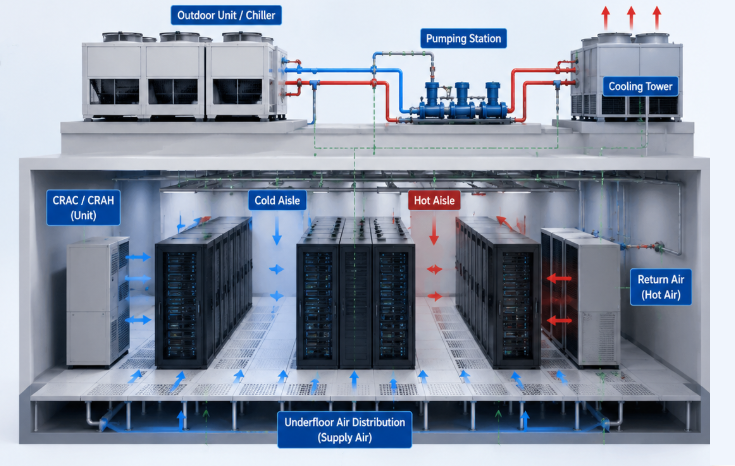
O CRAC perimetral — condicionadores de ar para salas de computadores posicionados ao longo das paredes, soprando ar frio por um piso elevado — tem sido o método padrão de ar condicionado de data center há décadas. Ele funciona. Até que deixa de funcionar.
De acordo com dados de campo compilados pela CRAC.services, a eficiência do resfriamento perimetral entra em colapso quando a densidade dos racks ultrapassa 10 kW por gabinete. A física é direta: o caminho do ar de uma unidade montada na parede até um rack a 15 metros de distância é longo demais. O ar frio se mistura com o ar quente de exaustão antes de chegar às entradas dos servidores. A pressão do seu pleno de piso não consegue escalar o suficiente sem deslocar as placas do lugar.
Agora acrescente clusters de treinamento de IA que exigem 30–100 kW por rack. De acordo com o relatório Vertiv Data Center 2025, 41% dos profissionais do setor esperam um modelo híbrido de gestão térmica ar-líquido como o novo padrão. Sua configuração perimetral legada nunca foi projetada para essa realidade. Este não é um problema incremental — é um descasamento arquitetural completo.
Entendendo a Arquitetura de Resfriamento de Precisão Baseado em Fileiras
O resfriamento de precisão baseado em fileiras posiciona unidades de resfriamento estreitas diretamente dentro da fileira de servidores, entre os seus racks. Em vez de empurrar o ar por 15 metros através da sala, o caminho do ar se reduz para aproximadamente 30–50 cm, da unidade de resfriamento até a entrada do rack. Cada unidade entre racks entrega 10–50 kW de capacidade de resfriamento, dependendo do modelo — sendo o Vertiv Liebert CRV o design de referência mais implantado nesse segmento.
Seu corredor quente se torna o caminho de retorno. O ar frio entra pela frente do rack, absorve o calor dos servidores, é exaurido para o corredor quente contido e flui diretamente de volta para a entrada da unidade entre racks. O circuito é fechado. A recirculação — o principal inimigo do ar condicionado de data center baseado em perimetral — praticamente desaparece.
Essa arquitetura também resolve o dilema do retrofit. Se você tem um data hall legado onde 80% dos racks operam a 5 kW, mas duas fileiras de servidores GPU precisam de 35 kW cada, você instala unidades entre racks nessas duas fileiras e deixa seu CRAC perimetral cuidando do restante. Você não está arrancando sua infraestrutura existente; está adicionando capacidade cirurgicamente onde sua densidade exige.
Cálculo de Carga do Ar Condicionado de Data Center
Erros no cálculo de carga são a causa raiz da maioria das falhas de resfriamento de precisão. Uma pesquisa do setor da Airventec China mostra que 85% das salas de computadores definem setpoints de temperatura mais baixos do que o necessário — consumindo 15–25% mais energia do compressor e, mesmo assim, falhando em eliminar os pontos quentes. A correção começa com um cálculo de carga preciso.
Primeiro, calcule sua carga de TI pelo consumo real, não pela potência nominal. Servidores raramente consomem 100% da potência nominal. Um fator de carga realista é de 60–80% da potência de placa. Para um rack com 10 servidores de 1,200 W cada, sua carga real está mais próxima de 7.2–9.6 kW, e não de 12 kW. Dimensionar demais o ar condicionado do seu data center com base nos números nominais desperdiça capital e força seus compressores a um ciclo de carga parcial ineficiente.
Segundo, considere o calor das perdas do UPS, da iluminação e das pessoas — tipicamente 5–10% da carga de TI. Terceiro, aplique diretamente as diretrizes térmicas da ASHRAE TC 9.9: a temperatura de entrada dos seus servidores deve ficar entre 18–27°C, com a umidade relativa mantida entre um ponto de orvalho mínimo de 5.5°C e 60% de UR máxima. Se você está operando seu corredor frio a 18°C quando a ASHRAE permite 25°C, cada grau de resfriamento desnecessário custa aproximadamente 3–5% em energia anual, de acordo com os mesmos dados do setor.
Regras de Contenção de Corredor Quente e Gestão de Fluxo de Ar
Resfriamento de precisão entre racks sem contenção de corredor quente é desperdício de dinheiro. Os dois são inseparáveis. Quando você instala unidades entre racks, mas deixa seus corredores quente e frio abertos, o ar frio de fornecimento contorna as entradas dos servidores por completo — retornando em curto-circuito para a entrada da unidade de resfriamento sem nunca fazer trabalho útil.
A contenção total do corredor quente — com painéis rígidos, portas e barreira no teto — força cada metro cúbico de ar quente de exaustão a retornar pelas suas unidades entre racks. A contenção de corredor frio é a alternativa: você fecha o corredor frio e deixa o restante da sala se tornar o pleno de retorno quente. A escolha depende do layout da sua instalação. De qualquer forma, a contenção é inegociável. Dados da análise técnica da 51cps.net mostram que a contenção de corredor quente devidamente vedada reduz o consumo de energia do resfriamento em 20–30% por si só, independentemente de upgrades de equipamentos.
Você também precisa fechar cada slot U não utilizado do rack com painéis cegos. Uma única abertura de 1U na frente do rack permite que o ar frio contorne os servidores por completo, criando um atalho de baixa resistência que degrada o resfriamento de todos os racks a jusante. Sua cobertura de painéis cegos deve exceder 95%.
Escolhendo o Sistema para o Seu Resfriamento de Precisão
Suas unidades de resfriamento entre racks vêm em duas variantes principais: expansão direta (DX) e água gelada (CW). Cada uma tem um perfil operacional rígido.
As unidades DX possuem seu próprio circuito de refrigerante e compressor. Elas são autossuficientes — sem necessidade de circuito de água gelada da instalação. Isso torna a DX a escolha padrão para pequenas salas de servidores, sites de borda e retrofits em que levar tubulações de água gelada até uma fileira específica é proibitivamente caro. O trade-off: a eficiência em carga parcial cai mais rápido do que com água gelada, e sua capacidade máxima por unidade normalmente atinge o teto em torno de 30 kW.
As unidades entre racks a água gelada se conectam à central de chillers do seu prédio. Elas escalam com eficiência — o COP em carga parcial permanece alto porque os compressores da sua central lidam com uma carga maior e mais estável. Para implantações acima de 30 kW por rack ou instalações com várias fileiras, a água gelada é quase sempre o caminho de menor custo total de propriedade. Se você está com dificuldades para manter a estabilidade de temperatura durante variações de carga, usar uma ferramenta de monitoramento pode ajudá-lo a acompanhar a variação da temperatura de entrada em tempo real em todos os racks e identificar quais fileiras precisam de rebalanceamento de capacidade antes que os pontos quentes se transformem em interrupções.
Retrofits de Ar Condicionado de Data Center
Fazer retrofit de resfriamento de alta densidade em um data hall ativo parece caro — e pode ser, se você escolher a abordagem errada. Os trocadores de calor de porta traseira (RDHx) oferecem o caminho de retrofit de menor fricção. Um trocador de calor aletado é parafusado na parte traseira do seu rack existente, conecta-se ao fornecimento de água gelada e remove 80–90% do calor do rack na porta, antes que ele entre na sala. Seu CRAC perimetral lida apenas com os 10–20% residuais. Sem reconfiguração em toda a instalação. Sem mudanças no layout das fileiras.
Retrofits de resfriamento entre racks exigem um pouco mais de planejamento — você precisa alocar 30–60 cm de espaço na fileira por unidade de resfriamento —, mas o ganho de capacidade é proporcionalmente maior. Para racks operando a 20–50 kW, o entre racks é o ponto ideal prático.
A conta fecha quando você considera o tempo de inatividade evitado. Uma única interrupção não planejada por sobrecarga térmica custa a um operador típico de colocation entre $500,000 e $1 milhão em penalidades de SLA e perda de clientes, com base nos dados de custo de interrupções do Uptime Institute. Seu retrofit de resfriamento de precisão se paga na primeira vez que evita um desligamento térmico.
Evitando os 5 Erros Mais Comuns no Resfriamento de Precisão
Definir a temperatura muito baixa
Cada grau abaixo da faixa recomendada pela ASHRAE custa 3–5% em energia, sem nenhum benefício de confiabilidade.
Ignorar o controle de umidade
O ar condicionado de data center deve gerenciar tanto a carga sensível quanto a latente. Ponto de orvalho abaixo de 5.5°C causa descarga eletrostática — invisível para você até que um DIMM falhe misteriosamente. Acima de 60% de UR, o risco de condensação aumenta. Suas unidades de precisão precisam de umidificação e desumidificação funcionando, não de sensores contornados.
Operar com compressores de velocidade fixa
O estudo da Airventec constatou que 44% dos data centers ainda operam com resfriamento de velocidade constante. Os inversores de frequência variável (VFD) adaptam a velocidade do compressor à carga em tempo real, reduzindo o consumo de energia em 30–50%. Se seus compressores ligam e desligam a cada poucos minutos, você está gastando dinheiro para criar oscilações de temperatura.
Implantar contenção sem modelagem CFD
A simulação de dinâmica de fluidos computacional (CFD) custa alguns milhares de dólares e leva uma semana. Ela mostra exatamente onde estão suas zonas mortas, circuitos de recirculação e desequilíbrios de pressão antes de você instalar um único painel. Pular a CFD é o caminho mais rápido para gastar seis dígitos em uma contenção com desempenho abaixo do esperado.
Negligenciar seu cronograma de manutenção
Filtros entre racks entopem. Serpentinas de água gelada incrustam. A carga de refrigerante vaza lentamente ao longo de meses. Cada um desses fatores degrada silenciosamente a capacidade do seu ar condicionado de data center até que a próxima onda de calor o empurre para além do ponto de inflexão.
Cadência de Manutenção do Seu Ar Condicionado de Data Center
Você precisa de um cronograma de manutenção escrito e cumprido. Filtros de ar entre racks: inspecionar mensalmente, substituir trimestralmente — com mais frequência se sua instalação estiver perto de obras ou em uma região de alta poeira. Serpentinas de água gelada: limpeza química anual. Carga de refrigerante DX: teste de pressão a cada seis meses. Bandejas de drenagem e linhas de condensado: inspecionar trimestralmente para evitar danos por água nos racks entre os quais suas unidades entre racks ficam posicionadas.
Os sensores de temperatura em cada entrada de rack devem ser calibrados anualmente contra uma sonda de referência. Um sensor lendo 2°C a menos significa que sua temperatura real de entrada está 2°C acima do que o painel do DCIM exibe — e 2°C é a diferença entre operação estável e throttling térmico em CPUs modernas.
O mercado de ar condicionado de data center deve crescer de $2.1 bilhões em 2024 para $5.8 bilhões até 2030, segundo a DataString Consulting — um CAGR de 18.3% impulsionado quase inteiramente pela transição do resfriamento no nível da sala para a gestão térmica de precisão no nível das fileiras. As escolhas de infraestrutura que você faz hoje determinam se sua instalação acompanha essa curva de crescimento ou fica para trás atendendo racks de 5 kW enquanto o setor migra para 50.