

The International Energy Agency projects global data center electricity demand will double between 2025 and 2030, reaching roughly 945 TWh—comparable to Japan’s total electricity consumption. Cooling alone accounts for 30% to 55% of energy consumption in conventional data centers.
So what’s the move? Free cooling for data center.
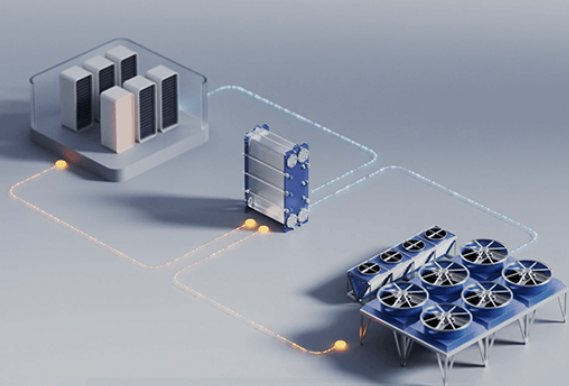
In this post, I‘ll walk you through the real energy savings, payback periods, and practical strategies for deploying free cooling in your data center—without the marketing fluff. Let’s get into it.
What Exactly Is Free Cooling for Data Center?
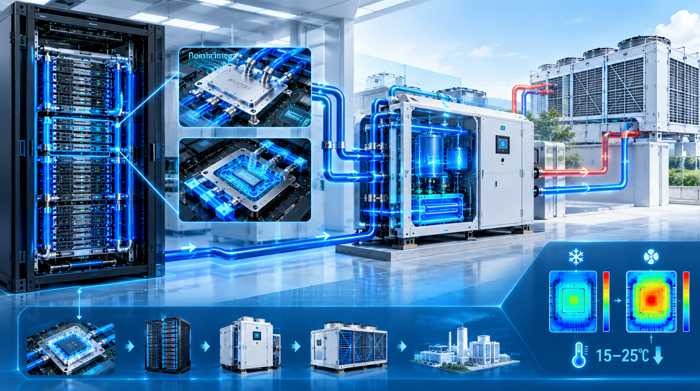
Here’s the simplest way to think about it: instead of running energy-hungry compressors and chillers year-round, free cooling harnesses outdoor ambient air to cool your facility—partially or fully—when conditions allow.
Free cooling technologies generally fall into a few main categories:
- Air-side economizers bring outside air directly into the data center (or through filters and mixing chambers). This is the most direct method and often delivers the highest energy savings.
- Water-side economizers use outdoor ambient temperatures to cool the water in your chilled water loop before it reaches the chillers, reducing or eliminating compressor run time.
- Indirect evaporative cooling uses evaporative processes to cool air or water without introducing outside humidity directly into your server rooms.
Each approach has its sweet spot depending on your climate zone and existing infrastructure. But the core principle is the same: leveraging nature to cut your cooling bill.
Why You Can‘t Afford to Ignore the Data Center Cooling Energy Problem
Before we dive into savings numbers, let’s acknowledge the elephant in the server room. Data centers globally consume about 460 terawatt-hours of electricity annually, with cooling representing up to 40% of total energy use in traditional facilities. In some older setups, that figure climbs even higher.
The IEA warns that while global energy efficiency is improving, data center electricity demand is growing faster than efficiency gains can keep up. And with AI workloads pushing rack densities beyond what conventional air cooling can handle, the pressure is only mounting. NVIDIA‘s GPU roadmap shows power consumption doubling every two years, reaching 1,500 watts per chip by 2026.
So here’s your reality check: You can either continue down the path of escalating energy costs, or you can adopt strategies that reduce your cooling energy consumption by 30%, 50%, or even 80%. I know which path I’d choose.
The Energy Savings You Can Actually Expect from Free Cooling
Let me give you real numbers, not theoretical maximums. I‘ve dug into the latest research and real-world deployments to give you a clear picture.
Double-Digit Percentage Reductions Across the Board
A recent study on a novel dual-loop free cooling system predicted energy savings of roughly 30% while reducing or eliminating mechanical cooling equipment altogether. In real-world deployments, Microsoft achieved approximately 30% annual energy savings in its Canadian subsidiary’s data center by installing free cooling chillers, with the added benefit of compressors running less often and significantly extending their life expectancy.
For those of you operating in tropical climates where you might think free cooling isn‘t viable, think again. Research in Singapore showed that direct free cooling for data center return air delivers an annual average energy saving of around 20.0%—even under tropical conditions.
Air-Side vs. Water-Side: Which Saves More?
A comparative study modeling air-side economizers (ASE) and water-side economizers (WSE) across different climate regions found that ASE consistently outperformed WSE due to its wider operating temperature range. In Seoul, applying ASE reduced annual PUE from 1.275 to 1.209. And in cooler climates like Toronto, the savings were even more pronounced—PUE decreased by 0.078.
The PUE Game-Changer
Power Usage Effectiveness (PUE) is the metric that keeps data center operators up at night. Good news: free cooling delivers serious PUE improvements. One integrated energy system study showed PUE decreasing from 1.36 to 1.30, driving a 23.45% reduction in electricity expenses.
And here‘s an even more dramatic example: a feasibility study on zero-energy data centers found that a free cooling system combined with a PV generator resulted in an 83% reduction in cooling demand and improved PUE from 1.8 down to 1.1. Yes, you read that right—from 1.8 to 1.1. That’s the difference between industry-average performance and best-in-class efficiency.
The Bottom Line: ROI and Payback Periods
Now let‘s talk dollars and cents. Because at the end of the day, energy savings only matter if they translate into real financial returns.
Case Study: 69% Energy Cost Drop + 1.29-Year ROI
This is my favorite real-world example. Secure I.T. Environments completed a cooling infrastructure upgrade for a major UK telecommunications provider, replacing 20-year-old air conditioning units with three energy-efficient free cooling units. The results? A 69% reduction in annual energy costs, a Cooling PUE of 1.13, and an ROI achieved in just 1.29 years. That‘s not a typo—just over a year to recoup your investment.
Chris Wellfair, Projects Director at Secure I.T. Environments, put it perfectly: “The advances in data center cooling equipment deliver substantially improved energy efficiency and a rapid return on investment. These projects should be seen as investments in resilience and reduced operational costs”.
More Payback Data Points to Consider
- An energy-economic analysis of a 21 kW-load case study found payback periods of 2.11 to 3.75 years for a PVT-assisted free cooling system, depending on system sizing.
- A multi-climate analysis of retrofit plans with water-side economizers showed dynamic payback periods ranging from 2.02 to 5.6 years, with energy savings rates of 61-66%.
- A zero-energy feasibility study pegged the payback period for a free cooling + PV system at 6 years at minimum retrofit cost, with the free cooling component alone delivering an 83% cooling demand reduction.
The takeaway? Even in less-than-ideal scenarios, you‘re looking at full payback within three to six years. In optimal conditions, you could see ROI in less than two years. Where else can you get that kind of return on infrastructure investment?
Beyond Energy Savings: Extended Equipment Life
Here’s a benefit that doesn‘t always make it into the headline: when your compressors run less often—especially avoiding low-temperature operation—their service life extends significantly. That means lower maintenance costs, fewer emergency repairs, and less capital tied up in premature equipment replacement. It’s a secondary ROI that keeps paying out year after year.
Choosing the Right Free Cooling for Your Data Center
Not all free cooling solutions are created equal, and picking the wrong approach for your climate and facility can leave money on the table. Let me break down your main options.
Air-Side Economizer (Direct Free Cooling)
Best for: Facilities in cool, dry climates with good outdoor air quality.
This approach directly brings filtered outside air into your data center. It‘s simple, cost-effective, and delivers excellent savings. The catch? You need to manage humidity and particulate matter. But if you’re in a region with clean, dry air for much of the year, this is your most efficient option.
Water-Side Economizer
Best for: Facilities with existing chilled water infrastructure.
This approach uses a cooling tower or dry cooler to reject heat from your chilled water loop without running compressors. It‘s a great retrofit option because it works with your existing system. However, water-side economizers typically require lower ambient temperatures to operate efficiently than air-side systems.
Indirect Evaporative Cooling
Best for: Warmer climates where direct air-side cooling isn’t feasible.
IEC cools air without adding moisture to your data center environment, using evaporative processes to pre-cool incoming air or water. It‘s more complex than direct air-side cooling but opens up free cooling hours in climates that would otherwise be off-limits.
Hybrid Systems
Best for: Maximizing free cooling hours across all seasons.
Many modern free cooling chillers operate in hybrid free cooling mode, where free cooling and mechanical refrigeration work together to deliver a smooth, efficient operating curve across the seasons. The key to successful hybrid operation? Optimized control strategies that maximize ambient heat rejection whenever conditions allow.
How to Maximize Your Free Cooling Savings
I’ve seen too many operators install free cooling hardware only to see disappointing results. Here‘s what separates the winners from the also-rans:
1. Don’t Treat Free Cooling as an “Add-On”
A common mistake is treating free cooling as an optional enhancement to a conventional chiller. Instead, make “free cooling first” a core requirement at the specification stage. Choose chillers designed to maximize ambient heat rejection whenever conditions allow, not only at very low outdoor temperatures.
2. Optimize Your Controls Strategy
Many systems claim to support partial free cooling but spend very little time in a truly optimized “in-between” state. The differentiator is an optimized control strategy matched to appropriate hardware. Look for designs that can modulate free cooling and mechanical cooling smoothly, avoiding the binary on/off trap.
3. Leverage Higher Temperature Setpoints
Developments in hot aisle containment and modern air management typically allow for higher coil air-on temperatures and increased chilled-water setpoints, both of which expand the ambient temperature range where free cooling can operate effectively. Raise your setpoints—within ASHRAE guidelines—and you’ll extend your free cooling hours significantly.
4. Consider Cold Thermal Energy Storage
Integrating free cooling with cold thermal energy storage allows you to shift cooling capacity across time—producing cooling when outdoor air is cool and ambient temperatures are low, then using that stored energy during peak hours. Model predictive control strategies can optimize PUE further, with studies showing PUE reductions of 0.0185 in mild climate zones.
The Future of Data Center Free Cooling
We‘re seeing rapid innovation in this space. Combined free cooling systems integrated with waste heat recovery are achieving comprehensive COPs above 4.6, with carbon emission reductions reaching 90% in optimal climates.
All-day passive radiative cooling—where sky-facing surfaces spontaneously reject heat into space without consuming electricity or water—is emerging as an exciting new technique. One configuration showed water savings of roughly 84% annually when applied to compressed refrigerant prior to the chiller condenser.
Your Next Move
Here’s my advice: start with an energy audit of your current cooling system. Understand your baseline PUE, your compressor run hours, and your climate‘s free cooling potential. Then build a business case using the numbers I’ve shared here—30% energy savings on the conservative end, 69% in optimal conditions, payback in 1.3 to 6 years depending on your setup.
Free cooling for data center isn‘t some bleeding-edge experiment. It’s a proven, mature technology that‘s delivering real savings for operators worldwide right now. And with energy prices rising and regulatory pressure mounting, waiting isn’t a strategy—it‘s a liability.
Have you deployed free cooling in your facility? I‘d love to hear about your results—drop me a line or share your experience in the comments. And if you’re just getting started, drop your questions below, and I‘ll do my best to help you navigate the options.