


This guide will tell you from a senior technical perspective how to calculate the data center cooling load Requirements.
If you’ve ever managed a data center, you know the stress of balancing cooling performance and cost. I’ve been in your shoes: staring at a server rack that’s running 5°F above ASHRAE’s recommended limit, wondering if the data center cooling system is undersized… or if I’m just wasting energy on a system that’s too big. The truth is, calculating data center cooling load isn’t just about plugging numbers into a formula—it’s about understanding your unique facility, your IT equipment, and the real-world factors that make every data center different.
Cooling failures are one of the most common causes of data center outages—Uptime Institute’s 2025 report found they account for 14–19% of all unplanned downtime. And when downtime hits, it costs an average of $9,000 per minute for mid-sized facilities, according to the same report. On the flip side, an oversized cooling system can waste 20–30% of your energy budget, eating into profits and increasing your carbon footprint.
That’s why I’ve put together this guide—drawn from 8 years of managing data centers of all sizes, from small colocation spaces to enterprise-grade facilities. We’ll use the gold standard: ASHRAE’s Thermal Guidelines for Data Processing Environments, along with insights from TIA-942 standards, to walk you through a step-by-step calculation process. No jargon-heavy fluff, no random data dumps—just practical, actionable advice that works for real-world scenarios.
What Is Data Center Cooling Load, Really?
Let’s start with the basics—because I’ve found that even experienced teams sometimes mix up “cooling load” with “cooling capacity.” Simply put, data center cooling load is the total amount of heat you need to remove from your facility to ensure effective data center cooling to keep your IT equipment running safely. It’s not just about temperature—it’s about balancing sensible heat and latent heat, both of which impact your hardware’s lifespan and performance.
ASHRAE— the American Society of Heating, Refrigerating and Air-Conditioning Engineers—sets the global standard for data center operating conditions, and their guidelines are non-negotiable if you want to avoid equipment failure. Here’s what you need to remember (and I’ve taped this to my office wall for quick reference):
- Temperature range: 18–27°C (64–80°F) — I’ve found that keeping it around 24°C (75°F) strikes the best balance between equipment safety and energy efficiency.
- Relative humidity: 40–60% RH — Too dry, and you risk static electricity; too humid, and you get condensation on sensitive components. I once had a small data center in a coastal area that ignored this, and we ended up replacing three servers due to water damage.
- Dew point: -9–15°C — This is often overlooked, but it’s critical for preventing condensation in cold aisles.
In most data centers, sensible heat makes up 70–80% of the total cooling load, while latent heat accounts for the remaining 20–30% (per ASHRAE’s Fundamentals Handbook Chapter 18). That means your data center cooling system needs to prioritize temperature control, but you can’t ignore humidity—critical for reliable data center cooling—especially in regions with extreme weather.
The Heat Sources You Can’t Ignore
When I first started calculating cooling load, I made the mistake of only focusing on IT equipment. Spoiler: that’s a recipe for disaster. IT gear does generate 80–90% of the heat in your data center, but the other 10–20% comes from sources that are easy to overlook—all of which impact data center cooling needs. Let’s break down each source, with real-world examples from my experience:
1. IT Equipment Load
This is the foundation of your cooling load calculation. Servers, storage arrays, network switches—all of these convert 100% of the electrical power they use into heat. That’s right: if a server uses 500W of power, it generates 500W of heat. It’s a 1:1 ratio, and that’s non-negotiable.
Pro tip: Don’t just use the “nameplate power” of your equipment. I’ve seen teams do this, and it leads to undersizing. Nameplate power is the maximum the equipment can use, but in reality, most servers run at 60–80% of that capacity. Use your power monitoring toolsto get real-time power draw data—this will make your calculation far more accurate.
2. Lighting Load
LED lighting is standard in most modern data centers, and it’s far more efficient than old fluorescent bulbs—but it still generates heat. The rule of thumb is 5–10 W/ft² (54–108 W/m²). For a 1,000 sq. ft. data center, that’s 5,000–10,000 W of heat—enough to overload a small cooling unit if you forget to include it.
I learned this the hard way: a client once expanded their data center by 500 sq. ft. and added LED lighting, forgetting it would increase data center cooling requirements, but forgot to factor it into their cooling load. Within a week, their CRAC units were running at 100% capacity, and servers were starting to throttle. Adding that extra 2,500–5,000 W to their calculation fixed the issue.
3. Occupant Load
People generate heat too—even if your data center is mostly unmanned. ASHRAE estimates 400 BTU/h (117 W) per occupant. That might seem small, but if you have 5 technicians working in the facility for 8 hours a day, that’s 5 × 400 × 8 = 16,000 BTU/h of extra heat. For small data centers, this can make a noticeable difference.
4. Electrical Infrastructure Heat
Your UPS, PDU, and switchgear aren’t 100% efficient—they lose energy as heat. Here’s what I’ve found in practice (and it lines up with ASHRAE data):
- UPS inefficiency: 5–10% of your IT load. If your IT load is 100 kW, your UPS will generate 5–10 kW of heat.
- PDU/switchgear losses: 2–3% of your IT load. For that same 100 kW IT load, that’s another 2–3 kW of heat.
This is another common oversight. I once worked with a data center that had a 200 kW IT load but forgot to include UPS and PDU losses—they ended up with a cooling system that was 14 kW undersized. It took a summer heatwave and a few server outages to realize their mistake.
5. Building Envelope Heat Gain
Your data center’s walls, roof, and windows let in heat from the outside—how much depends on your climate. ASHRAE recommends 0.15–0.25 kW/m² for most regions. In hot, sunny areas, it’s closer to 0.25 kW/m²; in cooler climates, it’s around 0.15 kW/m².
Roof insulation is key here. If your roof isn’t properly insulated, you’ll have significantly higher heat gain. I once upgraded a data center’s roof insulation from R-10 to R-30, and it reduced envelope heat gain by 40%—that’s a huge savings in cooling costs.
6. Fresh Air Make-Up Load
Most data centers need fresh air for ventilation (to maintain air quality and meet code requirements). The heat from this outdoor air adds to your cooling load, and it varies based on the outdoor temperature and how much fresh air you’re bringing in. For example, if you’re bringing in 1,000 CFM of outdoor air at 35°C (95°F) and your data center is at 24°C (75°F), that’s a significant amount of extra heat to remove.
Step-by-Step Cooling Load Calculation
Now that we’ve covered the heat sources, let’s walk through the calculation process I use every time I audit a data center. This method is based on ASHRAE standards, but I’ve simplified it for real-world use—no advanced engineering degree required. First, let’s get the unit conversions out of the way:
- 1 kW = 3.412 BTU/h (this is the most important one—memorize it!)
- 1 Ton of Refrigeration (TR) = 12,000 BTU/h (cooling equipment is often sized in tons, so this is critical for equipment selection)
- Total Cooling Load (kW) = IT Load + Non-IT Heat Gains + Safety Margin
Step 1: Calculate IT Equipment Heat Load
Start with your IT load—this is the baseline. As I mentioned earlier, use real-time power draw data, not nameplate power. Here’s the formula:
IT Load (BTU/h) = Total IT Power (kW) × 3.412
Example: If your IT equipment draws 100 kW of real-time power (not nameplate), your IT heat load is 100 × 3.412 = 341,200 BTU/h. That’s a big number, but it’s the foundation of your calculation.
Pro tip: If you don’t have real-time power monitoring, use the “nameplate power × 0.7” rule of thumb. Most servers run at 70% of their nameplate capacity, so this is a safe estimate if you don’t have better data.
Step 2: Calculate Non-IT Heat Loads
Now, add up all the secondary heat sources we discussed. Let’s use the same 100 kW IT load example to make it concrete:
- Lighting: Let’s say your data center is 1,000 sq. ft. Using 7 W/ft² (the middle of the ASHRAE range), that’s 1,000 × 7 = 7,000 W = 7 kW. Convert to BTU/h: 7 × 3.412 = 23,884 BTU/h.
- Occupants: 3 technicians working 8 hours a day. 3 × 400 BTU/h = 1,200 BTU/h (we don’t multiply by hours because cooling load is per hour).
- Electrical losses: UPS (8% of IT load) + PDU (2% of IT load) = 10% total. 100 kW × 0.10 = 10 kW = 34,120 BTU/h.
- Building envelope: 1,000 sq. ft. = 92.9 m². Using 0.20 kW/m² (average climate), that’s 92.9 × 0.20 = 18.58 kW = 63,395 BTU/h.
- Fresh air: Let’s say you’re bringing in 1,000 CFM of outdoor air at 30°C (86°F). Using ASHRAE’s fresh air heat gain formula, this adds about 5 kW = 17,060 BTU/h (the exact number depends on outdoor humidity, but 5 kW is a safe estimate for most regions).
Total Non-IT Load = 23,884 + 1,200 + 34,120 + 63,395 + 17,060 = 139,659 BTU/h (or 40.93 kW).
Step 3: Add a Safety & Growth Margin
This is the step that separates good calculations from great ones. Data centers grow—IT equipment gets added, power density increases, and unexpected heat sources pop up. ASHRAE recommends a 10–20% safety margin, but I’ve learned to be more conservative, especially for mission-critical facilities.
For most data centers: 20% margin. For critical facilities (like those hosting financial or healthcare data), Uptime Institute recommends 25% margin. Let’s use 20% for our example:
Subtotal Load (BTU/h) = IT Load + Non-IT Load = 341,200 + 139,659 = 480,859 BTU/h.
Safety Margin = 480,859 × 0.20 = 96,172 BTU/h.
Step 4: Final Sizing & Unit Conversion
Now, add the safety margin to get your total cooling load, then convert it to tons (the unit most cooling equipment is sized in):
Total Cooling Load (BTU/h) = 480,859 + 96,172 = 577,031 BTU/h.
Total Cooling Load (Tons) = 577,031 ÷ 12,000 = 48.08 Tons.
So, for this 100 kW IT load data center, you’d need a cooling system rated at approximately 48 tons. I always round up to the nearest whole number (in this case, 50 tons) to account for any unexpected heat gains—better to have a little extra capacity than not enough.
Critical Factors That Impact Your Calculation
Calculating cooling load isn’t a one-and-done process. There are several factors that can throw off your numbers if you’re not careful. Here are the ones I’ve learned to watch for:
1. Rack Power Density
Rack density is the amount of power per rack (kW/rack), and it’s one of the biggest factors in data center cooling load—directly shaping data center cooling needs. Low-density racks (5–10 kW/rack) are easy to cool with standard CRAC/CRAH systems. But high-density racks (20–50 kW/rack)—common in cloud data centers or AI facilities—require specialized cooling, like liquid cooling or rear-door heat exchangers.
I once worked with a client that had 30 kW/rack density but tried to use standard CRAC units. The result? Hotspots in the racks, server throttling, and frequent cooling system alarms. We had to upgrade to rear-door heat exchangers, which added 15% to the cooling load calculation—but it was worth it to keep the equipment safe.
2. Power Usage Effectiveness (PUE)
PUE is the ratio of total data center energy use to IT energy use. A PUE of 1.0 means all energy goes to IT equipment (impossible in real life), while a PUE of 2.0 means half the energy goes to cooling and other non-IT systems. Cooling typically consumes 30–50% of total data center energy, so a lower PUE (1.2–1.4) means less cooling load waste.
If your PUE is high (above 1.5), it’s a sign that your cooling system is inefficient—maybe you have poor airflow management, or your system is oversized. Fixing PUE can reduce your data center cooling load by 10–20%, making your data center cooling more efficient.
3. Climate & Ambient Temperature
Your location matters more than you think. In hot, humid regions (like Florida or Texas), you’ll have higher envelope heat gain and more latent heat to remove. In cold climates (like Canada or Alaska), you can use free cooling (also called “economizer mode”) to reduce your cooling load by 30–60% during the winter.
I managed a data center in Minnesota, and during the winter, we used free cooling 80% of the time—this cut our cooling costs by 50% and reduced our cooling load by 40%. If you’re in a cold climate, don’t forget to factor free cooling into your calculation—it can save you a lot of money.
4. Airflow Management
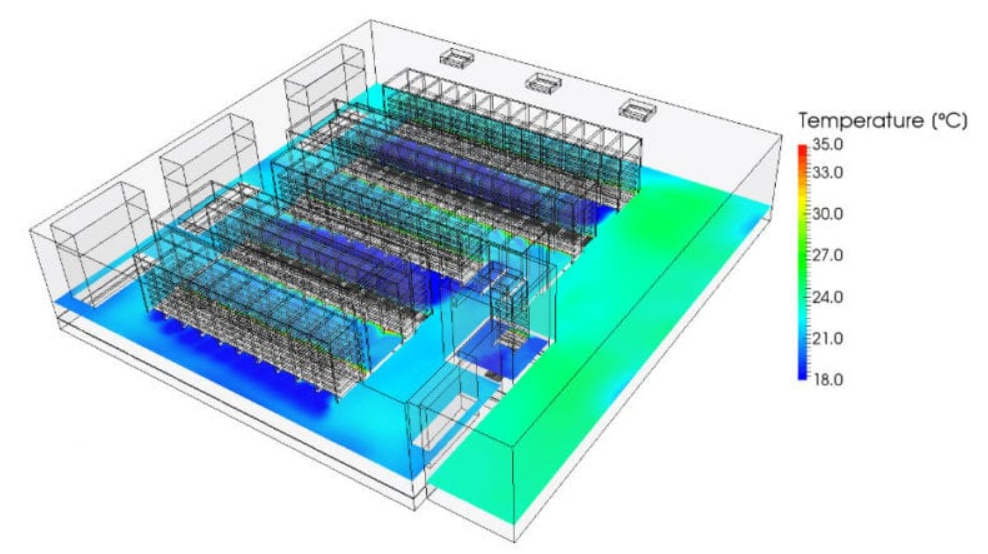
Poor airflow is the enemy of efficient cooling. Hot/cold aisle containment is an ASHRAE best practice that can reduce cooling load by 15–25%. I’ve seen data centers without containment where 30% of the cooling air was wasted (it mixed with hot air before reaching the servers).
If you’re not using containment, your cooling load calculation will be off—you’ll need more cooling capacity to compensate for the wasted air. Investing in containment is one of the easiest ways to reduce your cooling load and save energy.
Common Mistakes to Avoid (I’ve Made Them All)
Even the most experienced teams make mistakes when calculating cooling load. Here are the ones I’ve learned to avoid, after years of trial and error:
- Underestimating IT load growth: Plan for 3–5 years of expansion. I once calculated a cooling load for a client that only planned for 1 year of growth—within 18 months, they needed to add another cooling unit, which cost them an extra $50,000.
- Skipping the safety margin: It’s tempting to cut corners to save money, but a missing safety margin will cost you more in the long run. I’ve seen a data center with no safety margin that had to shut down 10 servers during a summer heatwave to avoid overheating.
- Ignoring airflow design: Hotspots can make your cooling load calculation irrelevant. Even if your total load is correct, poor airflow can cause overheating. Always factor in airflow management (like containment) when calculating load.
- Using comfort cooling HVAC: Comfort cooling systems (like the ones in offices) are not designed for data centers. They cycle on and off, which can cause temperature fluctuations, and they’re not built to handle constant heat loads. Always use data center-specific cooling equipment (CRAC/CRAH units, liquid cooling).
- Forgetting to update calculations: Your cooling load changes as you add equipment, upgrade infrastructure, or change your facility. I update my calculations every 6 months—this ensures my cooling system is always sized correctly.
Conclusion
By following ASHRAE standards, accounting for all heat sources, and adding a safety margin, you can avoid the two biggest pitfalls in data center cooling: undersizing and oversizing.
From my experience, the best calculations are a mix of data and real-world insight. Use the tools, follow the steps, but also trust your gut—if something feels off (like a cooling system running at 100% capacity), double-check your numbers. And always work with a certified MEP engineer for mission-critical facilities—they can help you fine-tune your calculation and avoid costly mistakes.
At the end of the day, reliable data center cooling is about balance: balancing heat removal with energy efficiency, balancing current needs with future growth, and balancing data with real-world experience. With this guide, you’ll be able to calculate your cooling load with confidence—and keep your data center running smoothly, no matter what.