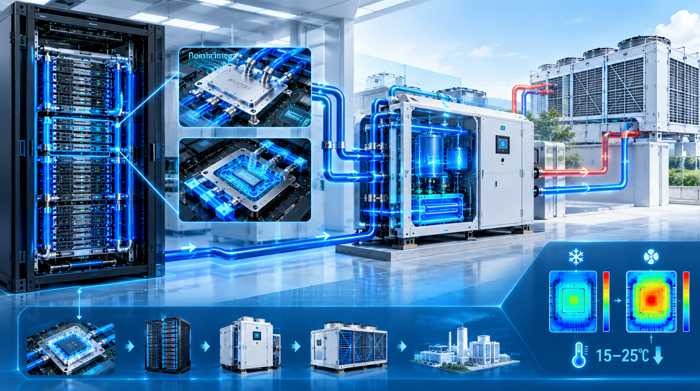



Most micro data center failures trace back to one decision: the cooling system was selected before the rack density was fixed. The corrective rule is simple. Air cooling manages roughly 10-15 kW per rack. Rear-door and in-row units handle 20-40 kW. Direct liquid cooling carries 50 kW and beyond. Choose the architecture after locking the compute load. A 2026 Verhi analysis reports air systems struggle past 15 kW per rack, while liquid-cooled modules reach a PUE near 1.1.
Why does a micro data center keep overheating?
Micro data center demand is climbing fast, yet overheating reports keep rising. Research and Markets projects the market will grow from 7.48 billion dollars in 2024 to 27.93 billion by 2029, a compound annual growth rate near 30 percent. AI inference at the edge pushes per-rack loads from the old 5-10 kW standard up to 20-50 kW. That heat now concentrates inside a compact enclosure with no raised floor and little thermal mass.
Most failures are not mechanical breakdowns. They are design mismatches. Teams buy a micro data center sized for average load, then populate it with GPU inference servers generating three times the heat. Local hot spots form around dense racks before the air system can react. By the time alarms fire, component temperatures have already exceeded safe operating envelopes. The enclosure itself offers almost no buffer against thermal spikes.
Compounding the problem, a micro data center often sits in a plant room, a factory floor, or a rooftop where ambient conditions are harsh. Data Centre Solutions notes that edge micro units benefit from compact high-density cooling precisely because air paths and noise budgets are limited. Without deliberate airflow design, recirculated hot air raises inlet temperatures and silently degrades component reliability over months. Recirculation, not total heat, is usually the real culprit.
What is a micro data center, exactly?
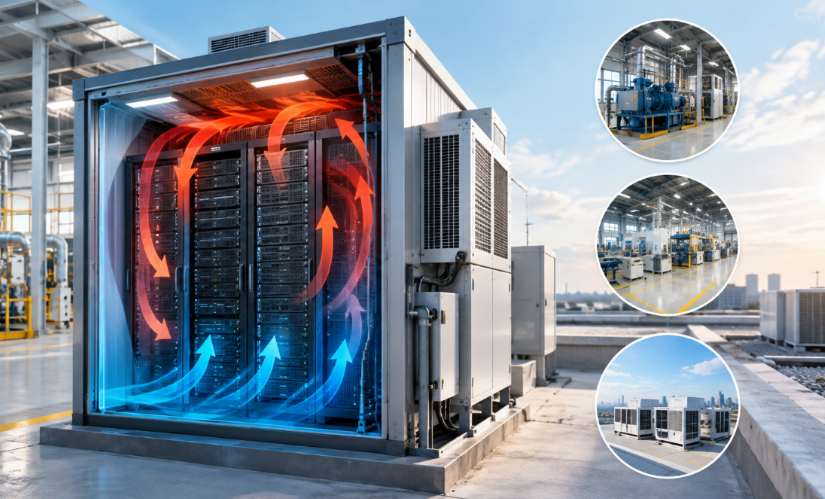
A micro data center is a prefabricated, self-contained unit that integrates racks, power distribution, cooling, fire suppression, and monitoring in a single enclosure. It arrives factory-tested and becomes operational after you connect power, network, and cooling water. Traditional brick-and-mortar builds take 18-36 months, while a modular micro data center deploys in weeks. Xometry notes that modular units reach service in 6-24 weeks, often inside 20 or 40 foot ISO container footprints. Factory testing catches wiring and cooling defects before shipment.
Typical configurations deliver between 50 kW and 1.2 MW of total IT capacity depending on rack count and density. They serve retail stores, telecom sites, factory floors, hospitals, and remote locations where a full facility is economically impossible. Because every subsystem is pre-engineered, the micro data center keeps a small footprint while packing enough compute for local workloads. Vapor IO deployed 36 modular units across 20 cities in 11 months, proving the model at scale.
Why does rack density decide the micro data center cooling strategy?
Rack density is the single filter that narrows cooling choices. Every cooling method has a hard power ceiling, so the kilowatts per rack select the architecture before any vendor comparison begins. Standard racks running 5-10 kW stay comfortably on air. AI-heavy racks drawing 20-50 kW exceed what fan-based systems can reject reliably. A micro data center configured for one density band cannot cheaply migrate to another after purchase.
| Rack density | Cooling approach | Typical PUE | Best fit |
|---|
| 5-15 kW | Air (CRAC/CRAH) | 1.4-1.6 | Storage, networking, low-density inference |
| 20-40 kW | Rear-door or in-row DX | 1.2-1.4 | Mixed edge AI inference |
| 40-50 kW | Liquid-assisted air | 1.2-1.3 | Dense inference clusters |
| 50+ kW | Direct-to-chip liquid | 1.1-1.2 | GPU training, HPC, future AI nodes |
The table collapses the selection problem into one row lookup. Match the density band to the cooling approach, then verify the vendor supports that architecture. This order matters because every design trade-off flows from the kilowatt figure. Fix density first, and cooling, power distribution, and redundancy decisions all fall into place. Higher density also leaves less thermal slack when a fan or pump fails.
When is air cooling still right for a micro data center?
Air cooling remains a defensible choice when rack density stays at or below 15 kW and the site sits in a temperate climate. The system is cheap, familiar, and requires no water chemistry or leak management. Servers designed for front-to-back airflow operate exactly as intended. For storage nodes, networking gear, and modest inference workloads, an air-cooled micro data center delivers solid uptime at the lowest capital cost. It remains the default for many entry-level edge sites.
Air loses its advantage in hot environments. Moduledge warns that when ambient temperature reaches 40-50 degrees Celsius, DX condensers lose efficiency sharply and may need oversizing by 30-50 percent. Energy use rises, noise grows, and the cooling plant consumes a disproportionate share of the power budget. If the micro data center must tolerate extreme summers or dusty industrial air, air-based cooling demands careful filtration and generous condenser headroom from the start.
At what density must a micro data center switch to liquid?
The crossover point sits near 15-20 kW per rack. Above that, air systems require extreme airflow, high fan speeds, and careful containment to keep inlet temperatures in spec. Rear-door heat exchangers remove 20-40 kW per rack, while in-row DX units extend into the 40-80 kW range. Direct liquid cooling becomes necessary above roughly 50 kW per rack, where cold plates carry 80-150 kW and beyond. A liquid-capable micro data center covers the full AI inference roadmap.
Liquid wins on physics. Water holds roughly 3,500 times the volumetric heat capacity of air, so a compact coolant loop removes heat that would require enormous airflow. Direct-to-chip cold plates capture 70-80 percent of the thermal load at the chip surface before air is involved. Verified results show liquid-cooled modules reaching PUE values near 1.1, versus 1.3-1.5 for air systems. Lower PUE directly cuts the electricity bill for every year of operation.
Rear-door, in-row, or direct-to-chip: which fits your micro data center?
Rear-door heat exchangers mount water-cooled coils on rack exhaust and work with any existing air-cooled server. They suit 20-40 kW racks but add 100-200 mm of depth and introduce coolant piping and potential leak points. In-row DX units sit between racks and handle 40-80 kW, making them a strong middle option for mixed-density deployments. Both approaches avoid modifying the servers themselves, which reduces risk and preserves vendor warranty coverage.
Direct-to-chip cooling requires liquid-ready servers and a coolant distribution unit, or CDU. The CDU isolates facility water from the IT loop, manages pumps, filters particulates, and monitors flow, temperature, and pressure. Operators must plan water quality, glycol percentages, corrosion inhibitors, and leak detection from day one. Above 80 kW per rack, direct liquid or immersion is the only reliable path. Immersion demands specialized hardware, so most micro data center operators reserve it for extreme density or harsh dust environments.
What should you size and budget before buying a micro data center?
Size cooling capacity against the worst-case IT load, not the average. A liquid loop and an air system serve different density bands, so the budget conversation starts with the kilowatt-per-rack figure. Redundancy planning follows: N+1 protects against a single fan or pump failure, while 2N guards against whole-system loss.
Floor loading, water availability, power feed, and fiber access all constrain the final site choice. Each constraint can block a micro data center deployment if checked too late. Confirm every utility at the site before signing the order, because a missing power feed alone can delay go-live by months.
Cost realism matters. Modular micro data center hardware carries a 10-20 percent premium per kilowatt compared with conventional construction, according to Xometry. An Indian market analysis by CxO Today reports prefabricated builds running 20-30 percent higher upfront cost per megawatt, though they deploy in 8-12 weeks instead of 12-24 months. Lower PUE reduces operating cost every year, so efficiency investments often pay back quickly. Compare total cost of ownership, not sticker price.

What mistakes sink most micro data center cooling deployments?
The most common error is selecting cooling before the density target exists. Teams order a standard air-cooled micro data center, then install GPU nodes that demand liquid. The second error is ignoring the site climate, then discovering the condenser is undersized in summer. Skipping water quality management leads to corrosion and biofouling inside the loop within months. Each mistake becomes expensive retrofits or prolonged downtime that erases the deployment speed advantage.
Leak detection is non-negotiable in any liquid configuration, yet many small sites omit it to save cost. Underprovisioning redundancy leaves a single pump failure capable of taking the whole unit offline. Finally, failing to reserve a liquid upgrade path traps operators in air designs that cannot grow. Lock the density number first, then match the cooling architecture to it. A correctly specified micro data center holds temperature through its full service life.